Lightpanda: The Lightweight Headless Browser for AI Agents (123MB vs Chrome's 2GB)
Discover Lightpanda, an open-source headless browser built with Zig for AI agents and web automation. Learn how it uses 123MB RAM instead of Chrome's 2GB, supports Playwright, Puppeteer, and MCP, and how to install it.
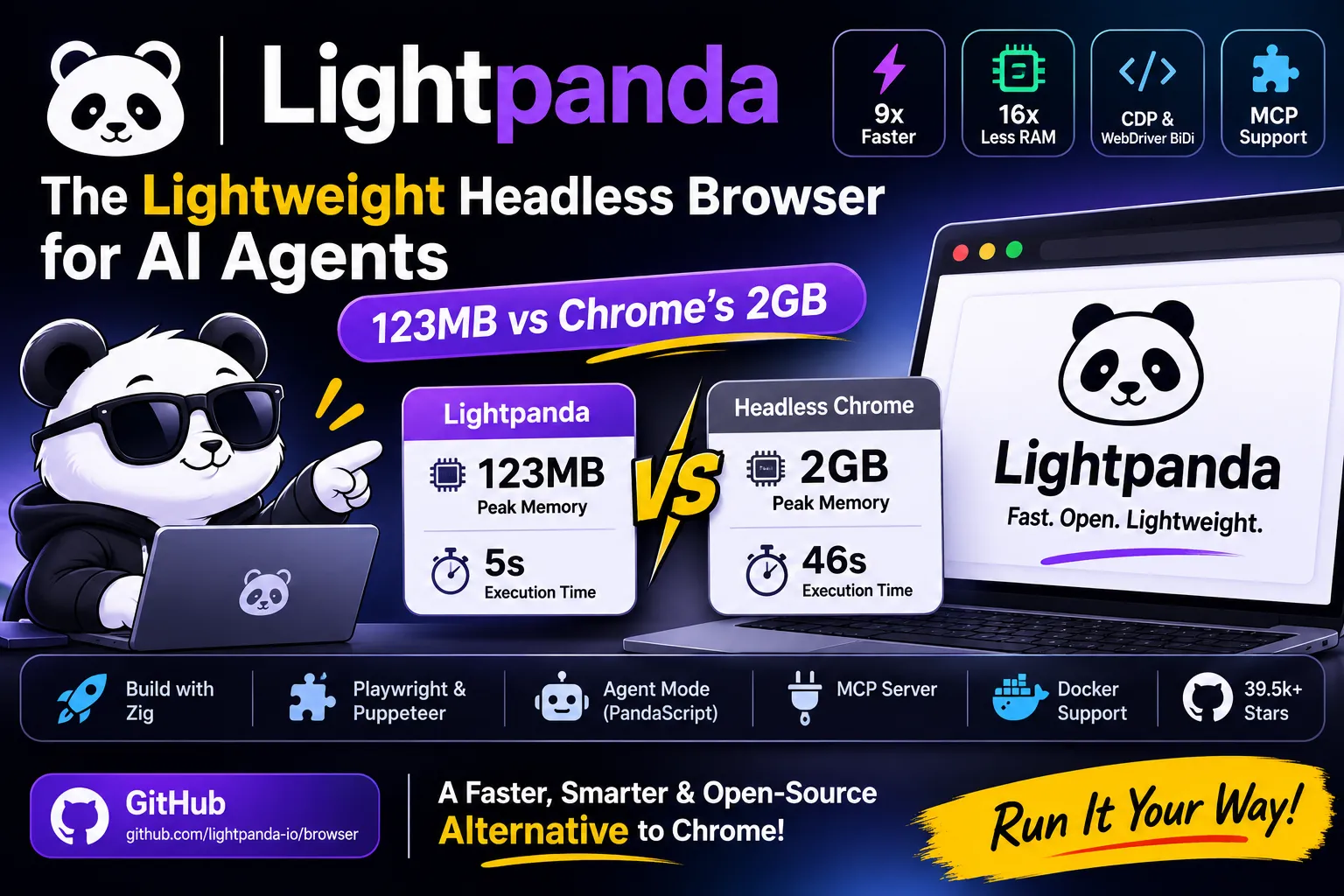
Lightpanda: the headless browser that uses 123MB where Chrome uses 2GB
Lightpanda is an open source headless browser written from scratch in Zig for AI agents and automation. On the project’s own benchmark, it loaded 100 pages in 5 seconds with 123MB of peak memory. Headless Chrome needed 46 seconds and 2GB for the same job.
It has 39.5k stars on GitHub, speaks the Chrome DevTools Protocol, and ships a native MCP server. It’s also beta software under AGPL-3.0, so the real question is whether it fits your workload.
Here’s what it does, how to run it, and where it still falls short.
What is Lightpanda?
Lightpanda is a headless browser built for machines. It executes JavaScript, builds a DOM, handles cookies and network requests, and skips graphical rendering completely.
The code lives at github.com/lightpanda-io/browser. The README describes it as built from scratch, with no Chromium, Blink, or WebKit underneath. The stack is Zig for the core, V8 for JavaScript, libcurl for HTTP, and html5ever for HTML parsing.
The repo has 11,478 commits, 1.9k forks, and a Discord community. The README lists these implemented features: CORS, XHR and Fetch, cookies, custom headers, proxy support, network interception, robots.txt support, CDP, WebDriver BiDi, and an adblocker.
Why not just use headless Chrome?
Chrome works fine for a handful of pages. It gets expensive when you run hundreds of instances, because each one carries a full desktop browser’s weight even with no screen attached.
The Lightpanda README makes the case in 3 points. Modern sites need JavaScript, so plain HTTP requests no longer cut it. Chrome at scale eats RAM and CPU. And many Chrome features have no use in headless mode.
Lightpanda’s pitch is to keep the JavaScript and drop the rendering. That’s where the memory savings come from.
How fast is Lightpanda compared to Chrome?
On the project’s benchmark, Lightpanda ran about 9x faster and used about 16x less memory than headless Chrome. The test requested 933 real web pages on an AWS EC2 m5.large instance.
| Metric (100 pages) | Lightpanda | Headless Chrome | Difference |
|---|---|---|---|
| Peak memory | 123MB | 2GB | ~16x less |
| Execution time | 5s | 46s | ~9x faster |
Treat these as vendor numbers. Wavect’s production review calls the benchmark vendor-run and reports it ran at 25-way concurrency. Your pages, your concurrency, and your JavaScript weight will move the result.
An older third-party writeup quoted 11x faster and 9x less memory on an earlier 100-page test. The direction holds across both. The exact multiple depends on the run.
How do you install Lightpanda?
Pick Homebrew, a binary download, Docker, or Nix. Windows has no native build, so use WSL2.
Homebrew:
1
brew install lightpanda-io/browser/lightpanda
Linux binary (x86_64):
1
2
3
curl -L -o lightpanda https://github.com/lightpanda-io/browser/releases/download/nightly/lightpanda-x86_64-linux && \
chmod a+x ./lightpanda
./lightpanda version
Docker:
1
docker run -d --name lightpanda -p 127.0.0.1:9222:9222 lightpanda/browser:latest
One gotcha will bite Alpine users. The Linux binaries link against glibc, so they fail on musl distros with a cannot execute: required file not found error. The README says x86_64 needs glibc 2.35 and arm64 needs 2.38. debian:bookworm-slim works on x86_64. On arm64, use ubuntu:24.04 or debian:trixie-slim.
There’s also no native Android build. Termux fails with the same error.
How do you fetch a page with Lightpanda?
Use the fetch command. It loads a URL, runs the JavaScript, and prints the result in the format you choose.
1
./lightpanda fetch --obey-robots --dump markdown https://example.com
The --dump flag takes html, markdown, structured_data, png, or pdf. The png and pdf options give a text-only rendering, so don’t expect pixel-perfect screenshots. structured_data returns JSON-LD, OpenGraph, Twitter card, meta, and link tags as JSON.
Markdown output is the interesting one for LLM work. You get clean text for a prompt without parsing HTML yourself.
Waiting flags help with JavaScript-heavy pages: --wait-until, --wait-ms, --wait-selector, and --wait-script. And --obey-robots makes the browser respect robots.txt. I’d leave it on by default.
Does Lightpanda work with Puppeteer and Playwright?
Yes, through CDP. Start the server, then point your client at it instead of launching Chrome.
1
./lightpanda serve --obey-robots --host 127.0.0.1 --port 9222
Then connect Puppeteer:
1
2
3
4
5
6
7
8
9
10
11
12
13
14
15
16
17
18
import puppeteer from 'puppeteer-core';

const browser = await puppeteer.connect({
  browserWSEndpoint: "ws://127.0.0.1:9222",
});

const context = await browser.createBrowserContext();
const page = await context.newPage();
await page.goto('https://demo-browser.lightpanda.io/amiibo/', {waitUntil: "networkidle0"});

const links = await page.evaluate(() =>
  Array.from(document.querySelectorAll('a')).map(a => a.getAttribute('href'))
);
console.log(links);

await page.close();
await context.close();
await browser.disconnect();
The rest of your script stays the same. That said, “drop-in” is generous. Wavect describes Lightpanda as a CDP-compatible alternative for supported workflows, and says compatibility testing stays mandatory. Run your own scripts against it before you migrate anything.
You can also bind to a Unix socket with --unix-socket, which creates an owner-only socket (mode 0600). For WebDriver BiDi, add --protocol webdriver.
What is Lightpanda’s agent mode and PandaScript?
Agent mode lets you drive the browser in plain English. You describe a task, and a built-in agent navigates, clicks, fills forms, and extracts data.
1
2
./lightpanda agent --task "top story on news.ycombinator.com?"
./lightpanda agent --no-llm        # REPL without a model
It supports Anthropic, OpenAI, Gemini, Vertex AI, Mistral, Hugging Face, Vercel AI Gateway, and OpenRouter. Any OpenAI-compatible endpoint works through OPENAI_BASE_URL, and local models run through Ollama or llama.cpp.
The output of a session is a PandaScript, which is plain JavaScript plus a few native browser primitives. Type /save to export one, then replay it:
1
./lightpanda run session.js
This is the clever part. You prototype with an LLM, then ship the saved script. It runs deterministically with no model calls and no token cost. The agent runs in the same process as the browser, so every tool call is a direct operation with no network hop.
How do you connect Lightpanda to an AI agent over MCP?
Lightpanda includes a native MCP server over stdio. Add this to your MCP client config:
1
2
3
4
5
6
7
8
{
  "mcpServers": {
    "lightpanda": {
      "command": "/path/to/lightpanda",
      "args": ["mcp"]
    }
  }
}
For several agents on one process, start it over HTTP:
1
lightpanda mcp --port 9223
Clients POST JSON-RPC to http://host:9223/mcp. Each connection gets its own browsing session with its own page, cookies, and memory. Two agents that send the same Mcp-Session-Id header share one session, which suits workflows where agents work the same page.
The run tool executes a PandaScript in the caller’s session. Cookies and storage persist between runs, so a login carries over. The default timeout is 60,000 ms.
A skill for Claude-style agents is available at lightpanda-io/agent-skill.
Can you build Lightpanda from source?
Yes. You need Zig 0.17.0 exactly, plus Rust, because the HTML parser (html5ever) is a Rust library. The README also lists V8 build dependencies.
On Debian or Ubuntu, install the packages first:
1
sudo apt install xz-utils ca-certificates pkg-config libglib2.0-dev clang make curl git
Then build with make build, or make build-dev for a debug build. You can also run zig build run directly. On macOS, add brew install cmake. Nix users can run nix develop for a ready shell.
Startup gets faster if you embed the V8 snapshot. By default, Lightpanda creates the snapshot at launch. The README shows how to generate it once and bake it into the binary with the -Dsnapshot_path build flag.
The project runs its own unit tests with make test and checks standards coverage against the Web Platform Tests. If you plan to contribute, you’ll sign a CLA during the pull request.
What are Lightpanda’s limits?
It’s beta, and it doesn’t render pixels. Wavect’s review calls it a strong pilot for high-volume extraction and non-visual agents. It lists screenshots, visual testing, extensions, and untested Chrome-specific behavior as poor fits.
A few more things to check before you commit:
- Bot detection. In the launch discussion on Hacker News, an Airtop engineer said non-Chromium browsers triggered bot detection quickly on their fleet. Test against your target sites.
- Licensing. The license is AGPL-3.0. If you embed it in a hosted product, get a lawyer’s read first. I’m not one.
- Telemetry. It’s on by default. Set
LIGHTPANDA_DISABLE_TELEMETRY=trueto turn it off. - Web API coverage. The project publishes daily Web Platform Tests results at perf.lightpanda.io/wpt, so you can check what works.
- Platforms. Native builds cover Linux and macOS on x86_64 and aarch64. Windows needs WSL2.
My advice matches Wavect’s. Benchmark a representative sample of your own pages and keep Chrome as a fallback.
Who should use Lightpanda?
Teams running high-volume scraping or crawling where Chrome’s memory bill hurts. Developers building AI agents that read pages as text or markdown. Anyone who wants to cut token costs by saving agent sessions as replayable scripts.
Skip it if you need screenshots, visual regression tests, browser extensions, or guaranteed Chrome parity. For those, Chrome is still the right tool.
Key facts at a glance
- Repo: github.com/lightpanda-io/browser, AGPL-3.0
- Popularity: 39.5k stars, 1.9k forks, 11,478 commits
- Built with: Zig 0.17.0, V8, libcurl, html5ever
- Benchmark (100 pages, vendor-run): 123MB vs 2GB memory, 5s vs 46s
- Protocols: CDP and WebDriver BiDi, default port 9222
- Dump formats: html, markdown, structured_data, png, pdf (text-only rendering)
- Agent mode: supports Anthropic, OpenAI, Gemini, Vertex AI, Mistral, OpenRouter, and local models
- MCP: stdio by default, HTTP with
lightpanda mcp --port 9223, isolated sessions per connection - Install: Homebrew, binary, Docker (
lightpanda/browser), or Nix - Windows: no native build, use WSL2
- Linux gotcha: needs glibc 2.35 (x86_64) or 2.38 (arm64), fails on Alpine
- Telemetry: on by default, disable with
LIGHTPANDA_DISABLE_TELEMETRY=true - Status: beta