Oil-Motion: AI-Powered Scroll and Mouse Animations for Websites
Learn how Oil-Motion turns AI-generated video into interactive web animations controlled by scroll, mouse, drag, touch, and device orientation. Explore its Python pipeline, TypeScript runtime, and Claude Code integration.
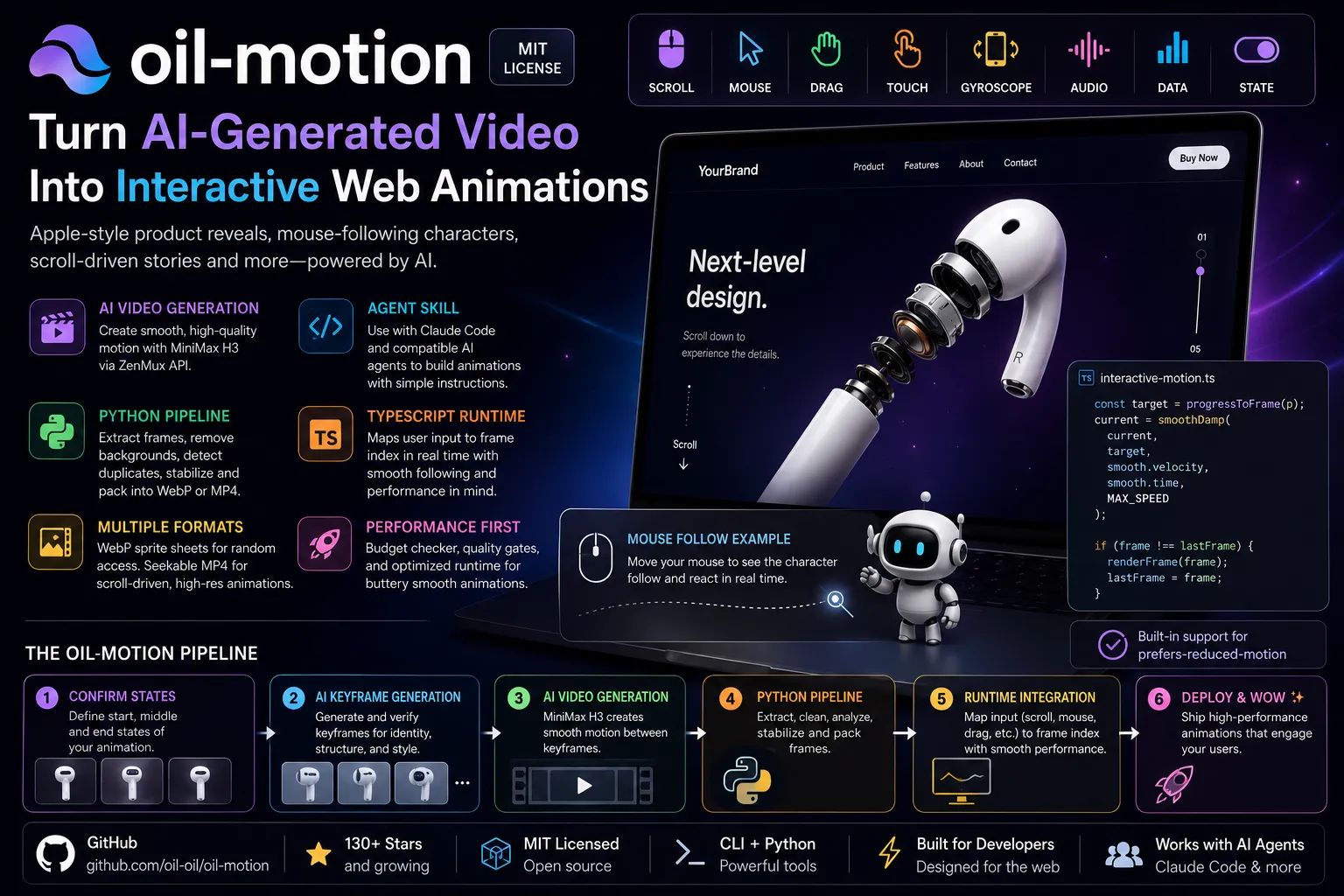
oil-motion: how to use AI-generated video as scroll and mouse animations on your website
The Apple AirPods product page has been quietly haunting developers for years. A product rotates, disassembles, and reveals its internals as you scroll, frame by frame. Replicating it used to mean weeks of 3D rendering work or a motion design studio budget. oil-motion does it with an AI video model and a Python pipeline.
It’s an open source agent skill for Claude Code that turns AI-generated video into scroll, mouse, drag, touch, and gyroscope-controlled web animations. The frames come from MiniMax H3. The interactivity comes from a TypeScript runtime that maps your user’s input position to a specific frame index in real time.
Here’s exactly how the whole system works.
What is oil-motion?
oil-motion is an MIT-licensed agent skill that lets you tell Claude Code (or any compatible AI agent) to build interactive frame-by-frame animations for a webpage. You describe what you want to animate and how users should control it. The agent handles keyframe generation, AI video production, Python-based frame processing, and the frontend runtime code.
The skill description covers designing, implementing, optimizing, and explaining interactive web animations driven by scroll, pointer, drag, touch, device orientation, audio, data, or component state. It’s designed for use when a webpage needs responsive visual motion for products, interfaces, diagrams, characters, or scene transitions.
The repo is at github.com/oil-oil/oil-motion. It has over 130 stars and 1 fork as of August 2026.
What problem does it actually solve?
CSS scroll-driven animations handle opacity fades, slide-ins, and parallax effects well. What they can’t do is show a product disassembling, a character turning its head, or a material changing texture as you scroll or move your mouse. Those require actual frame-by-frame content.
Apple popularized scroll-driven image sequences on product pages like AirPods Pro. These implementations refined the technique, focusing on smooth transitions and performance. Getting that effect previously required either pre-rendered 3D sequences or recording video in a studio, then splitting it into hundreds of still frames manually.
The dirty secret of these animations is they use a sequence of images, powered by GSAP plus ScrollTrigger and a numbered sequence rendered to canvas. oil-motion automates the entire sequence creation step using AI video generation, so you provide reference images and the AI fills in the motion between keyframes.
How does the keyframe-to-video pipeline work?
The core idea is direct: AI video models run forward, from start to finish. You can’t seek them to frame 47 or play them backwards. oil-motion converts AI-generated video into a set of prepared frames, then maps user input to a frame index.
The full process:
- Confirm what the animation looks like at its start, middle, and end states
- Generate static keyframe images and verify identity, structure, proportions, and style
- Submit the verified keyframes to MiniMax H3 to generate continuous motion between them
- Run the Python pipeline to extract frames, remove chroma key backgrounds, detect duplicates and flash frames, and check for structural consistency
- Pack the cleaned frames into a WebP sprite sheet or seekable MP4
- Use the TypeScript runtime to map scroll position (or mouse X/Y, drag progress, etc.) to the frame index
The default video model is ZenMux’s minimax/minimax-h3. It only changes when the user explicitly requests a different model or MiniMax cannot complete the goal.
Step 2 is load-bearing. If you skip keyframe verification and submit a video where the product structure or character proportions are wrong, the error runs through every frame. The skill enforces a hard rule: no video submission without verified keyframes.
What interaction types does oil-motion support?
oil-motion supports 8 interaction drivers: scroll, pointer, drag, touch, device orientation, audio, data, and component state.
Example use cases include: a product gradually unfolding or changing state as the page scrolls down; a character or pet naturally adjusting orientation as the mouse moves; an animation following a drag gesture forward and backward; touch and device orientation controls on mobile; and animations that trigger on click, hover, or component state changes.
Each driver maps to a “parameter model” that defines how input gets translated into animation progress:
| Model | Input type | Asset structure |
|---|---|---|
| linear | Scroll, drag, audio volume | Single timeline with start and end |
| circular | Mouse direction, 360° product view | Closed loop, first and last frames connect |
| 2d | Mouse X/Y, gyroscope tilt | 2D grid of sample frames |
| discrete | Hover, click, success/failure states | Multiple independent clips |
Two-dimensional mouse tracking needs actual 2D sampled frames, not a single back-and-forth video. A linear video can’t accurately represent both up-down and near-far changes simultaneously. The skill flags this and asks you to set up proper 2D sampling before generating any assets.
What does the Python pipeline do to the frames?
This is where most of the quality control happens. After AI video generation, the Python scripts run a series of deterministic checks and transformations on the raw frames.
motion_pipeline.py handles the full sequence:
1
2
3
4
5
6
7
8
9
10
11
12
13
14
# Check the source video
python3 "$OIL_MOTION/scripts/motion_pipeline.py" probe source.mp4

# Full build: extract, chroma key, analyze, pack into WebP atlas
python3 "$OIL_MOTION/scripts/motion_pipeline.py" build source.mp4 build/motion \
  --fps 24 \
  --key auto \
  --cell-width 240 \
  --cell-height 240 \
  --quality 88

# For non-transparent animations (product on solid background)
python3 "$OIL_MOTION/scripts/motion_pipeline.py" build source.mp4 build/motion \
  --fps 24 --key none --cell-width 320 --cell-height 180
motion_budget.py runs before video generation to catch problems early:
1
2
3
4
5
6
7
python3 "$OIL_MOTION/scripts/motion_budget.py" \
  --frames 123 \
  --display 268x468 \
  --dpr 2 \
  --scroll-pages 4 \
  --max-texture 4096 \
  --access random
The required cell size is the minimum pixel size per frame in the final sprite sheet, not the source video resolution. A higher source resolution doesn’t automatically mean the sprite sheet frames will be clear at display size. Run motion_budget.py --strict before generation; if it fails, change the display size, frame count, or asset format before continuing.
For loop animations, loop_cleanup.py finds the best frame to close the loop and removes near-duplicate frames around the seam:
1
2
3
4
python3 "$OIL_MOTION/scripts/loop_cleanup.py" frames frames-clean \
  --seam-window 24 \
  --duplicate-threshold 0.003 \
  --report build/loop-cleanup.json
And for scroll-driven animations that don’t need transparency, compile_scroll_video.py produces seekable MP4s for desktop and mobile:
1
2
3
4
5
python3 "$OIL_MOTION/scripts/compile_scroll_video.py" \
  source/master.mp4 build/scroll \
  --end-reference source/last-frame.png \
  --desktop-width 1920 \
  --mobile-width 1280
--strict mode exits with a non-zero code if upscaling, insufficient source resolution, or texture overrun is detected. The pipeline won’t silently degrade quality.
What asset format comes out the other end?
The choice of asset format depends on animation length, display size, transparency needs, and how the animation is controlled. WebP sprite sheets work best for transparent characters, short animations, and interactions that jump to arbitrary frames. Seekable MP4 works better for large product animations driven by scroll, since it has higher clarity and lower memory use than a large sprite sheet.
The output directory structure:
1
2
3
4
5
6
7
8
9
10
11
12
motion-name/
├── source/              # Reference images, raw video
├── frames/raw/          # Raw extracted frames
├── frames/final/        # Chroma-keyed, stabilized master frames
├── qa/
│   ├── analysis.json
│   └── contact-sheet.jpg
└── final/
    ├── motion.webp      # Sprite sheet path (random access)
    ├── motion-scrub-*.mp4   # Seekable MP4 path (scroll)
    ├── motion.json      # Frame count, dimensions, mapping info
    └── implementation.* # Runtime code for your project
The contact sheet (contact-sheet.jpg) is a grid of all frames in sequence, useful for spotting identity drift, flash frames, or structural breaks across the full animation before deploying.
How does the runtime handle smooth following?
The TypeScript runtime (assets/interactive-motion.ts) handles the mapping from user input to displayed frame. It doesn’t jump directly to the target frame on each input event.
The runtime converts input into a normalized parameter, maps the parameter to a target frame index, then uses a smoothDamp function with a maximum velocity cap to track toward the target frame. For circular sequences, it uses the shortest arc to avoid spinning backwards across the full loop when reversing direction. Each requestAnimationFrame only writes to the DOM once, and only when the integer frame index actually changes.
This matters for mouse-following animations specifically. A character that reacts to mouse position needs to feel alive, not lag badly or snap jerkily. The max velocity cap means you can flick the mouse quickly and the character follows with limited rotational speed, which looks intentional rather than glitchy.
For scroll-driven videos, the runtime controls video.currentTime directly rather than playing the video, which is why the frames need to be in a seekable MP4 format (full keyframes throughout, not a standard compressed video with sparse keyframes).
How do you install oil-motion with Claude Code?
Tell Claude Code to install the skill:
1
Help me install this skill: https://github.com/oil-oil/oil-motion
Once installed, configure your API key. Run:
1
python3 "$OIL_MOTION/scripts/oil_motion_config.py" set
The script hides input and saves the key to ~/.config/oil-motion/config.json, outside the project directory, with permissions limited to the current user’s read-write access. The ZENMUX_API_KEY environment variable is also supported and takes priority over the saved config.
You need a ZenMux API key for MiniMax H3 video generation. The Python pipeline also requires Python 3, Pillow, ffmpeg, and ffprobe.
Once configured, use oil-motion by describing what you want:
1
2
Use $oil-motion, make these 2 product images into a scroll animation
that gradually unfolds. Desktop needs to stay clear; mobile uses lighter assets.
Or for mouse-following:
1
2
3
Use $oil-motion, make this character follow the mouse and adjust orientation.
The motion needs to respond quickly but limit rotation speed so fast direction
changes don't look like it's glitching.
Who should use oil-motion?
Frontend developers building product marketing pages where a static hero section won’t cut it. Motion designers who want to prototype scroll animations without writing the full pipeline by hand. Teams using Claude Code who want product animations in their pages without hiring a 3D animator.
oil-motion sits in a specific niche: AI-generated frame sequences for interactive web animations. It doesn’t replace CSS scroll-driven animations for simple text reveals, and it doesn’t replace Lottie for vector icon animations. Its territory is product reveals, character animations, and scene transitions where the content needs to actually move in 3D or change structure between states.
Supported use cases include product introductions, character interactions, operation demonstrations, data changes, and chapter transitions.
The skill is in early development. Expect rough edges and API changes. The repo’s SKILL.md at 465 lines is the authoritative reference for the full pipeline, including MiniMax-specific parameters, loop cleanup options, and the QA checklist for final delivery.
Key facts at a glance
- Repo: github.com/oil-oil/oil-motion, MIT license
- What it is: agent skill for Claude Code and compatible agents
- AI video model: MiniMax H3 via ZenMux API (fixed default; others available on request)
- Interaction types: scroll, pointer (mouse), drag, touch, device orientation, audio, data, component state
- Parameter models: linear, circular, 2D, discrete
- Python requirements: Python 3, Pillow, ffmpeg, ffprobe
- Key scripts:
motion_pipeline.py,motion_budget.py,video_job.py,loop_cleanup.py,compile_scroll_video.py - Output formats: WebP sprite sheets (transparent/random access), seekable MP4 (scroll/high-res)
- Runtime:
interactive-motion.ts, smoothDamp with max velocity cap, one DOM write per rAF - API key storage:
~/.config/oil-motion/config.json(local only, user-only permissions) - Quality gate:
motion_budget.py --strictblocks generation when pixel or texture budget fails - prefers-reduced-motion: static fallback built into the runtime
- License: MIT