Kimi K3 GGUF - How to Run the World's Largest Open-Weight AI Model Locally
Learn how to run Moonshot AI's Kimi K3 GGUF locally with Unsloth. Explore GGUF quantizations, hardware requirements, llama.cpp setup, benchmarks, and performance of the 2.8T open-weight AI model.
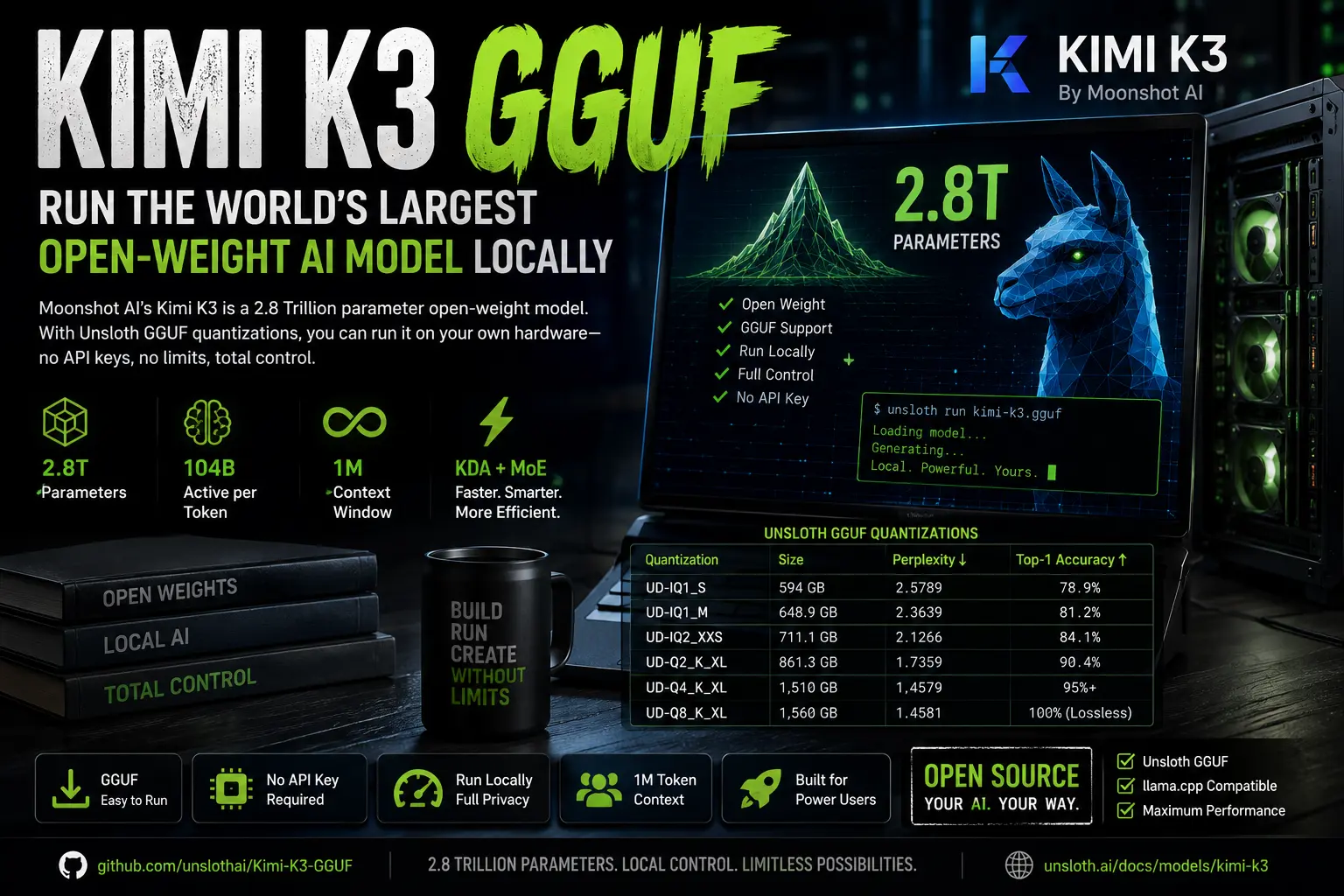
Kimi K3 GGUF: how to run the world’s largest open-weight AI model locally
Moonshot AI’s Kimi K3 is the largest open-weight model ever released. At 2.8 trillion parameters, it rivals proprietary frontier models while its weights are free to download. Unsloth’s GGUF quantizations, published July 29, 2026, make it runnable on local hardware. But “local” means something specific here: you’ll need hundreds of gigabytes of RAM, not a gaming PC.
Here’s exactly what the model is, what quantization options exist, and what you actually need to run it.
What is Kimi K3?
Kimi K3 is Moonshot AI’s 2.8-trillion-parameter flagship model for long-horizon coding, knowledge work, and deep reasoning, released July 14, 2026, combining native vision with a 1-million-token context window.
Moonshot describes it as the world’s first open 3T-class system and the largest open-weight AI model to date. The weights dropped on July 26, 2026, about a day ahead of the promised July 27 deadline.
Both the model code and weights are released under the Kimi K3 License. For questions, Moonshot AI’s support email is support@moonshot.ai.
What makes Kimi K3’s architecture different?
Kimi K3 uses 2 architectural innovations that set it apart from standard transformer models.
It uses Kimi Delta Attention (KDA) for 3 of every 4 attention layers. KDA is a linear attention mechanism: rather than comparing each new token to every previous token, it maintains a fixed-size memory that updates as it reads input. In Kimi Linear, an experimental model released in 2025, KDA cut memory use by up to 75% and multiplied output speed by up to 6 times at input lengths of 1 million tokens.
If you’re new to how attention mechanisms work under the hood, this breakdown of how LLMs actually work covers the transformer basics in plain English before you go deeper into K3’s architecture.
The second piece is the Mixture of Experts design. K3 activates just 16 of its 896 experts per token, roughly 1.8% of the pool. That’s 104 billion active parameters per forward pass, despite the 2.8 trillion total. This is what makes the model practical to serve at all, and why it can generate useful output at a fraction of the compute cost of a dense 2.8T model. The same MoE principle is what powers experimental frontier architectures like OpenMythos, which pairs it with looped transformers for silent latent-space reasoning.
Moonshot said these changes, along with a sparser MoE design and improved training recipes, made training about 2.5 times as efficient as Kimi K2’s training runs, measured in model improvement per unit of compute.
What GGUF quantizations does Unsloth offer?
Unsloth released 6 quantization tiers for Kimi K3 on July 29, 2026. Here’s the full table from their documentation:
| Quantization | Size | Perplexity | Top-1 Accuracy |
|---|---|---|---|
| UD-IQ1_S | 594 GB | 2.5789 | 78.9% |
| UD-IQ1_M | 648.9 GB | 2.3639 | 81.2% |
| UD-IQ2_XXS | 711.1 GB | 2.1266 | 84.1% |
| UD-Q2_K_XL | 861.3 GB | 1.7359 | 90.4% |
| UD-Q4_K_XL | 1,510 GB | 1.4579 | (near lossless) |
| UD-Q8_K_XL | 1,560 GB | 1.4581 | lossless |
UD-Q8_K_XL is truly lossless because Kimi K3 uses MXFP4 for MoE weights and BF16 for everything else, and Q8_K_XL follows that exactly. UD-Q4_K_XL is near full precision and requires 1.56 TB RAM or VRAM.
Unsloth recommends starting with UD-IQ1_S (594 GB) for the best balance of size and usability.
Why are the community GGUFs so much worse?
The community quants are larger yet degrade far more. For example, one 618.9 GB community IQ1_M quant exceeds Unsloth’s 594 GB 1-bit quant, but its perplexity jumps to 54.56, which is 21 times worse. The same pattern holds for IQ2_XXS: 725 GB at 96 PPL versus Unsloth’s 711 GB at 2.12 PPL, which is 45 times worse, meaning their 2-bit performs even worse than their own 1-bit.
The reason is calibration. Unsloth ran calibration against the lossless 1.56 TB UD-Q8_K_XL as the reference. Most community converters had no way to run the model at all when they converted, so they calibrated blind. The perplexity numbers show how badly that goes.
If you’re downloading a Kimi K3 GGUF, use Unsloth’s.
How much hardware do you actually need?
The minimum RAM required per quantization tier (combined RAM and VRAM):
| Quantization | Storage | Minimum RAM+VRAM |
|---|---|---|
| UD-IQ1_S (1-bit) | 594 GB | 610 GB |
| UD-IQ1_M (1-bit) | 648.9 GB | 665 GB |
| UD-IQ2_XXS (2-bit) | 711 GB | 726 GB |
| UD-Q2_K_XL (2-bit) | 861 GB | 880 GB |
| Q8 lossless | 1,560 GB | 1.6 TB |
Kimi K3 can run on a NVIDIA DGX Station, or a Mac Studio connected to a 128GB RAM device. The rule of thumb from Unsloth’s docs: your total RAM plus VRAM should roughly equal the quantization size. If you’re under that, the model offloads to disk and becomes painfully slow.
A real-world data point: a 64 GB M1 Max running K3 by streaming weights from a 2 TB SSD instead of holding them in memory produced around 16 seconds per token. Some configurations reported over a minute per token. That’s not usable for real work.
The full K3 weights need about 1,680 GB of VRAM. To run the full model, you need 8 B300 GPUs. Running an instance on Vast.ai costs roughly $85 to $86 per hour.
If you don’t have that hardware, the Moonshot API, OpenRouter, Together AI, and Fireworks AI all offer hosted access.
How do you run Kimi K3 in Unsloth Studio?
Unsloth Studio is the easier path. It’s an open-source web UI that handles RAM offloading and multi-GPU detection automatically.
Install it:
1
2
3
4
5
# MacOS, Linux, WSL
curl -fsSL https://unsloth.ai/install.sh | sh

# Windows PowerShell
irm https://unsloth.ai/install.ps1 | iex
Then launch:
1
unsloth studio
Open http://127.0.0.1:8888 in your browser. Search for Kimi K3 in the Model hub tab, pick your quantization tier, and download. Inference parameters auto-set on load, but you can toggle low, high, or max thinking manually.
Kimi K3 is thinking-only, with preserve_thinking always enabled and max thinking on by default. Instant mode isn’t supported. Thinking effort is configured with the reasoning_effort field, and K3 supports “low,” “high,” and “max” thinking efforts.
How do you run Kimi K3 with llama.cpp?
You’ll need Unsloth’s specific fork of llama.cpp, not the standard release. The fork adds vision support and some K3-specific bug fixes.
Clone and build:
1
2
3
4
5
6
7
8
9
10
git clone https://github.com/unslothai/llama.cpp
cd llama.cpp
git fetch origin pull/48/head:kimi-k3-fullsize-vision
git checkout kimi-k3-fullsize-vision
cd ..
cmake llama.cpp -B llama.cpp/build \
    -DBUILD_SHARED_LIBS=OFF -DGGML_CUDA=ON
cmake --build llama.cpp/build --config Release -j --clean-first \
    --target llama-cli llama-mtmd-cli llama-server llama-gguf-split
cp llama.cpp/build/bin/llama-* llama.cpp
For Apple Silicon, swap -DGGML_CUDA=ON to -DGGML_CUDA=OFF. Metal support is on by default for Mac.
Download the model (after pip install huggingface_hub):
1
2
3
4
hf download unsloth/Kimi-K3-GGUF \
    --local-dir unsloth/Kimi-K3-GGUF \
    --include "*mmproj-BF16*" \
    --include "*UD-IQ1_S*"
Run in conversation mode:
1
2
3
4
5
./llama.cpp/llama-cli \
    --model unsloth/Kimi-K3-GGUF/UD-IQ1_S/Kimi-K3-UD-IQ1_S-00001-of-00014.gguf \
    --mmproj unsloth/Kimi-K3-GGUF/mmproj-BF16.gguf \
    --temp 1.0 \
    --top-p 0.95
Context length goes up to 1,048,576 tokens. On B200s with the model fully in memory, you get around 20 tokens per second generation.
How does Kimi K3 benchmark against GPT and Claude?
These are Moonshot’s numbers, run at max thinking effort, confirmed by Unsloth’s documentation. Third-party scores from Artificial Analysis and Arena.AI are noted separately.
| Benchmark | Kimi K3 | Claude Fable 5 | GPT-5.6 Sol | Claude Opus 4.8 |
|---|---|---|---|---|
| GPQA Diamond | 93.5 | 92.6 | 94.1 | 91.0 |
| DeepSWE | 67.5 | 70.0 | 73.0 | 59.0 |
| Terminal-Bench 2.1 | 88.3 | 88.0 | 88.8 | 84.6 |
| BrowseComp | 91.2 | 88.0 | 90.4 | 84.3 |
| GDPval-AA v2 (Elo) | 1686 | 1747 | 1736 | 1593 |
| OSWorld 2.0 | 58.3 | 66.1 | 62.6 | 55.7 |
| MMMU-Pro | 81.6/83.4 | 81.2/86.5 | 83.0/84.6 | 78.9/82.7 |
On Arena’s Agent leaderboard, which rates how well models orchestrate tools on real tasks, Kimi K3 ranks first at 0.148, ahead of Claude Fable 5 at 0.099 and GLM-5.2 at 0.091.
Kimi K3 claimed the number 1 spot on Arena.AI’s Frontend Code Arena with a score of 1,679, outpacing Claude Fable 5 and GPT-5.6 Sol by a significant margin. (Claude Opus 5 later arrived and took the top spot.)
On cost, Kimi K3 at max reasoning costs about $0.95 per task on Artificial Analysis’s Intelligence Index, near GPT-5.6 Sol at $1.04 per task and cheaper than Claude Fable 5 at $2.75 per task.
K3’s capabilities outright beat previous generations of Claude and GPT in Moonshot’s benchmarks, while seemingly being around 2 to 3 times cheaper to run, and up to 10 times cheaper if a query lands in the cache.
Is the 1-bit version actually worth running?
Yes, with the right expectations. Unsloth’s UD-IQ1_S at 594 GB hits 78.9% top-1 accuracy and a perplexity of 2.58. That’s surprisingly good for 1-bit. The model handles tool calls reliably and can one-shot many tasks without intervention.
The 1-bit model retains ~78.9% accuracy after Unsloth shrunk it from 1.56 TB to 594 GB, a 62% size reduction.
The step up to UD-Q2_K_XL (861 GB) pushes accuracy to 90.4% and perplexity to 1.73. If your hardware can fit that extra 267 GB, the quality jump is significant for long-horizon reasoning tasks.
Lossless UD-Q8_K_XL at 1,560 GB matches the original MXFP4 precision exactly. That’s for research environments or production deployments where quality can’t be compromised.
Key facts at a glance
- Model: Kimi K3 by Moonshot AI, 2.8T parameters, 104B active per token
- Architecture: Kimi Delta Attention (KDA) + Attention Residuals, 896-expert MoE (16 active per token)
- Context window: 1,048,576 tokens
- Modalities: text, images, video (native multimodal, not added via adapter)
- Weights released: July 26, 2026, under Kimi K3 License
- GGUF released: July 29, 2026, by Unsloth (huggingface.co/unsloth/Kimi-K3-GGUF)
- Recommended quant: UD-IQ1_S (594 GB, 78.9% accuracy) or UD-Q2_K_XL (861 GB, 90.4% accuracy)
- Minimum hardware: ~610 GB combined RAM and VRAM for the 1-bit quant
- Full precision hardware: 8x B300 GPUs, ~$85-86/hr on cloud GPU rental
- KDA speed advantage: up to 6.3x faster decoding at 1-million-token contexts vs standard attention
- Training efficiency: ~2.5x better scaling than Kimi K2
- API cost: ~$0.94 per task (Artificial Analysis Intelligence Index, max thinking)
- Benchmark standout: #1 on BrowseComp (91.2), #1 on Arena Agent leaderboard, #1 on AutomationBench-AA
GGUF repository: huggingface.co/unsloth/Kimi-K3-GGUF
Run guide: unsloth.ai/docs/models/kimi-k3